
![2017-09-06 13_25_26-PowerPoint Slide Show - [Presentation1]](https://sqlundercover.com/wp-content/uploads/2017/09/2017-09-06-13_25_26-powerpoint-slide-show-presentation1.png?w=736)
Here is a little script that gives an overview of your current ONLINE databases, their data and log File names, sizes and growth rates – if the growth rate is a percentage it will calculate this for you so that it is represented as a value in MB in addition to showing you the Percentage value.
Here is an example:
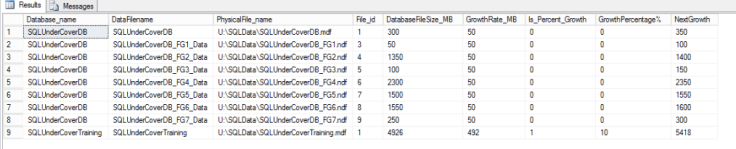
This can also be quite handy when you are looking for something specific too , perhaps you are looking for Growth rates that are less than a set number of MB say 100MB just simply add a Where clause to the query such as WHERE [GrowthRate_MB] < 100 🙂 Here is the code:
Not interested in Availability groups and want to see every online database on the server?
Try this version:
SELECT    [Database_name],
[DataFilename],
[PhysicalFile_name],
[File_id],
[DatabaseFileSize_MB],
[GrowthRate_MB],
[Is_Percent_Growth],
CASE [GrowthCheck].[is_percent_Growth]
WHEN 1
THEN [Growth]
ELSE 0
END AS [GrowthPercentage%],
[NextGrowth]
FROM
(
SELECT DB_NAME([Masterfiles].[Database_id]) AS [Database_name],
[Masterfiles].[Name] AS [DataFilename],
[MasterFiles].[physical_name] AS [PhysicalFile_name],
[MasterFiles].[File_id],
((CAST([Size] AS BIGINT) * 8) / 1024) AS [DatabaseFileSize_MB],
CASE [Masterfiles].[is_percent_Growth]
WHEN 0
THEN([Masterfiles].[Growth] * 8) / 1024
WHEN 1
THEN(((CAST([Size] AS BIGINT) * 8) / 1024) * [Growth]) / 100
END AS [GrowthRate_MB],
[Masterfiles].[is_percent_growth],
[Masterfiles].[growth],
CASE [Masterfiles].[is_percent_growth]
WHEN 0
THEN((CAST([Size] AS BIGINT) * 8) / 1024) + ([Growth] * 8) / 1024
WHEN 1
THEN((CAST([Size] AS BIGINT) * 8) / 1024) + (((CAST([Size] AS BIGINT) * 8) / 1024) * [Growth]) / 100
END [NextGrowth]
FROM   [SYS].[master_files] [Masterfiles]
INNER JOIN [sys].[databases] [DatabasesList] ON [Masterfiles].[database_id] = [DatabasesList].[database_id]
WHERE  [Masterfiles].[Database_ID] > 4		--Ignore System databases
--AND [Type_desc] = 'ROWS'			--Data Files only
AND [DatabasesList].State = 0		--Online Databases only
) [GrowthCheck]
ORDER BY [Database_name] ASC,
[File_ID] ASC;
Using Availability Groups?
If you are using Always on Availability groups ,then you may only be interested in Databases that are a part of a group where the Current server is acting as the Primary – use this version instead:
IF OBJECT_ID('TempDB..#AGDatabases') IS NOT NULL
DROP TABLE [#AGDatabases];

SELECT [Database_name],
[Groups].[name] AS [AGName]
INTO [#AGDatabases]
FROM   [Sys].[availability_databases_cluster] [AGDatabases]
INNER JOIN [sys].[dm_hadr_availability_group_states] [GroupStates] ON [AGDatabases].[group_id] = [GroupStates].[group_id]
INNER JOIN [master].[sys].[availability_groups] [Groups] ON [Groups].[group_id] = [GroupStates].[group_id]
WHERE  [primary_replica] = @@Servername;

SELECT    [GrowthCheck].[Database_name],
[#AGDatabases].[AGName],
[DataFilename],
[PhysicalFile_name],
[File_id],
[DatabaseFileSize_MB],
[GrowthRate_MB],
[Is_Percent_Growth],
CASE [GrowthCheck].[is_percent_Growth]
WHEN 1
THEN [Growth]
ELSE 0
END AS [GrowthPercentage%],
[NextGrowth]
FROM
(
SELECT DB_NAME([Masterfiles].[Database_id]) AS [Database_name],
[Masterfiles].[Name] AS [DataFilename],
[MasterFiles].[physical_name] AS [PhysicalFile_name],
[MasterFiles].[File_id],
((CAST([Size] AS BIGINT) * 8) / 1024) AS [DatabaseFileSize_MB],
CASE [Masterfiles].[is_percent_Growth]
WHEN 0
THEN([Masterfiles].[Growth] * 8) / 1024
WHEN 1
THEN(((CAST([Size] AS BIGINT) * 8) / 1024) * [Growth]) / 100
END AS [GrowthRate_MB],
[Masterfiles].[is_percent_growth],
[Masterfiles].[growth],
CASE [Masterfiles].[is_percent_growth]
WHEN 0
THEN((CAST([Size] AS BIGINT) * 8) / 1024) + ([Growth] * 8) / 1024
WHEN 1
THEN((CAST([Size] AS BIGINT) * 8) / 1024) + (((CAST([Size] AS BIGINT) * 8) / 1024) * [Growth]) / 100
END [NextGrowth]
FROM   [SYS].[master_files] [Masterfiles]
INNER JOIN [sys].[databases] [DatabasesList] ON [Masterfiles].[database_id] = [DatabasesList].[database_id]
WHERE  [Masterfiles].[Database_ID] > 4		--Ignore System databases
--AND [Type_desc] = 'ROWS'			--Data Files only
AND [DatabasesList].State = 0		--Online Databases only
) [GrowthCheck]
INNER JOIN [#AGDatabases] ON [GrowthCheck].[Database_name] = [#AGDatabases].[database_name]
ORDER BY [GrowthCheck].[Database_name] ASC,
[File_ID] ASC;

DROP TABLE [#AGDatabases];
 SQL Undercover
Leave a comment