

This was an interesting question that I was asked yesterday and something that I’d never really thought of before. Can you delete the top x number of rows based on an ORDER BY?
Why would you want to do that? Well let’s just assume that we have a ‘people’ table and some strange bug in the application has cause the need to delete the top 10 oldest females for whatever reason (I know, it’s very contrived example and not the situation that my colleague was facing but it’ll do to illustrate the point).
We have a table that looks something like this….

It’s easy enough to find the offending rows,
SELECT TOP 10 id, first_name, last_name, email, gender, DOB
FROM people
WHERE gender = 'Female'
ORDER BY DOB ASC
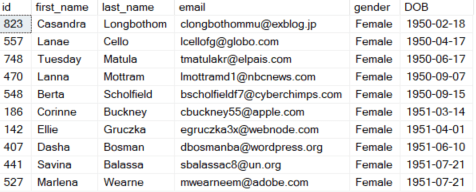
That’s easy enough, so can’t we just throw that into a DELETE statement?
DELETE TOP (10)
FROM people
WHERE gender = 'Female'
ORDER BY DOB ASC
Incorrect syntax near the keyword ‘ORDER’.
Ok that didn’t work did it? We know that we can use a TOP in a delete statement here so that’s fine, the problem is that we can’t use an ORDER BY, SQL just won’t let us do it. This is the question that a colleague came to me with.
So how can we achieve this? There has to be a way, right?
Well there is, actually there are two ways that we can do it.
Move the ORDER BY into a subquery.
We can move the row selection into a sub query and then use an IN (or semi-join) to filter only the row ids that we want to delete. How about something like…
DELETE
FROM people
WHERE id IN
(SELECT TOP 10 id
FROM people
WHERE gender = 'Female'
ORDER BY DOB ASC)
Well that appears to have worked, lets quickly rerun the SELECT from earlier to pull back all females ordered by DOB.

That’s looking good, the offending rows have vanished.
This is the method that I suggested (to be fair, my colleague was already heading down the right path with his solution, he just hadn’t got his predicate quite right). But then I thought to myself that you can also delete from a CTE and to me that seemed like a tidier and possibly safer method.
Using a CTE
The second solution involves using a CTE to select all the rows that we want to delete and then deleting everything from the CTE. Let’s have a look at what that code looks like…
WITH ToDelete
AS
(SELECT TOP 10 id, first_name, last_name, email, gender, DOB
FROM people
WHERE gender = 'Female'
ORDER BY DOB ASC)

DELETE FROM ToDelete
It hasn’t errored and it’s claiming 10 rows deleted. Let’s quickly check the table using that earlier SELECT again.
Looking good! Those original top 10 rows have gone.
Summary
So there are two different methods that you can use an ORDER BY to delete top x number of rows.
Personally I find the CTE method both the tidier and the safer. Tidier because to my eye it’s easier to see what you’re going to be deleting and safer because you can always run a SELECT from that CTE before you delete to sanity check the query and make sure that you’re going to be deleting the correct rows.
Thanks for reading and I hope you’ve found this useful.
 SQL Undercover
Is it an issue that those look awfully like live names and email addresses…?
LikeLike
Don’t panic, it’s all generated test data 🙂
LikeLike
That’s cool in itself! How do you do that?
LikeLike
There are a handful of tools out there which will do it for you. One that I use is http://www.onlinedatagenerator.com
LikeLike
Cheers, that’s really useful 🙂
LikeLike
This works for small tables. Assume you have to delete 10 records in a 200’000’000 records table, you have to perform an ORDER BY on the whole table and this leads to catastrophic performance (and a complete lock of the table in SQLserver). Of course, you could index the DOB column but this requires a lot of storage.
Are there better options ?
LikeLike
That’s a good question.
Unfortunately, to do this we’re going to need the data ordered one way or another. If you’re ordering on a non indexed column then as you say, it’s going to struggle for a big table. That ORDER BY is an expensive operation, it always is when you need to order data.
The only way to help things out is to index that DOB column, that would give SQL a source of ordered data and avoid the need to order at runtime.
There’s always a cost vs benefit when it comes to an index but size isn’t something that I’d be too worried about. It’s going to cost you a few GB but if you’re playing with tables with hundreds of millions of rows, that few GB is nothing in comparison to the likely size of the rest of the database.
LikeLike